Predictable Enemies are Boring Enemies
Until now, our enemies only move in a straight line. It works, but it doesn’t impress. Classic shooters like Galaga, Gradius, or R-Type have enemies that wave, orbit, and execute choreographed patterns.
The key to these movements are two mathematical functions: Sine and Cosine.
1. The Sine: The Wave
The Sine (sin) is a function that expects an angle in radians and returns values between -1 and 1 cyclically.
That doesn’t mean you necessarily have to pass it an angle; you can pass any real number, and it will return a value between -1 and 1. Therefore, we can pass time, for example, and we will get a value that oscillates smoothly between -1 and 1.
If we graph sin(x) where x goes from 0 to 2π (one full turn), we get a wave:
| Value of x | sin(x) |
|---|---|
| 0 | 0 |
| π/2 (90°) | 1 (max) |
| π (180°) | 0 |
| 3π/2 (270°) | -1 (min) |
| 2π (360°) | 0 |
After 2π, the cycle repeats infinitely.
0.00 rad1.0000.000What is it for in a game?
If we use time as input for sine, we get a value that oscillates smoothly:
var offset_y = sin(time) # Oscillates between -1 and 1var offset_y = sin(time) # Oscillates between -1 and 1Using the value returned by sin, and multiplying it by an amplitude, we expand the range of values; it no longer oscillates between -1 and 1, but between negative amplitude and positive amplitude. Therefore, if we want it to move in a range between -50 to 50 pixels, we will multiply by 50.
var offset_y = sin(time) * 50 # Oscillates between -50 and 50 pixelsvar offset_y = sin(time) * 50 # Oscillates between -50 and 50 pixels2. A New Enemy: The Helicopter
We are going to leave our basic plane (enemy_plane.gd) as it is, moving straight. For these new patterns, we will create a new enemy, the Helicopter, of which we will make 2 versions:
- Wave: Moves making waves.
- Orbit: Spins in perfect circles.
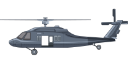
Right click -> Save image.
Credits: Assets Free Laser Bullets Pack 2020 by Wenrexa (CC0 1.0).
Step 1: The Wave Helicopter
- Create a new scene, add an
Area2Dnode and name itEnemyWave, also add aSprite2Dwith the helicopter sprite and aCollisionShape2D. - Add a script named
enemy_wave.gdtoEnemyWave. - Save the scene as
enemy_wave.tscn.
The Wave Script
We want this enemy to ripple vertically as it moves forward.
To start, copy and paste all the code from enemy_plane.gd into your new script enemy_wave.gd. From that base, we will add changes step by step.
1. Control Variables
We need to define how much the wave moves (amplitude) and how fast (frequency).
@export var wave_amplitude = 100.0  # Wave height (in pixels)
@export var wave_frequency = 3.0    # Oscillation speed
@export var wave_amplitude = 100.0 # Wave height (in pixels)
@export var wave_frequency = 3.0 # Oscillation speedWe also need to track time (to feed the sin function) and remember our initial height (to oscillate around it, not fly away).
var time = 0.0        # Time accumulator (internal clock)
var start_y = 0.0     # Our "baseline" on the Y axis
var time = 0.0 # Time accumulator (internal clock)
var start_y = 0.0 # Our "baseline" on the Y axis2. Save Initial Position
In _ready(), we must save the enemy’s initial Y position.
Why? Because the sin() function oscillates around 0 (goes up to +1, down to -1). If we applied that directly to position.y, the enemy would jump to the top of the screen (coordinate Y=0).
By saving start_y, we establish a new “center” for the oscillation. Thus, the enemy will oscillate up and down relative to where we placed it in the editor.
func _ready():
  start_y = position.y  # We save the height where we put it in the editor
  area_entered.connect(_on_area_entered)
func _ready():
start_y = position.y # We save the height where we put it in the editor
area_entered.connect(_on_area_entered)3. The Movement (The Formula)
Go to your _process(delta) function. Find the else block (which runs when the enemy is not dying) and replace its content with this:
func _process(delta):
  if is_dying:
      # ... (leave as was or see final script) ...
  else:
      # 1. ACCUMULATE TIME
      time += delta
      # 2. HORIZONTAL MOVEMENT (Keep the usual)
      position.x -= speed * delta
      # 3. VERTICAL MOVEMENT (The novelty)
      # Y = Center + sin(time * frequency) * amplitude
      position.y = start_y + sin(time * wave_frequency) * wave_amplitude
func _process(delta):
if is_dying:
# ... (leave as was or see final script) ...
else:
# 1. ACCUMULATE TIME
time += delta
# 2. HORIZONTAL MOVEMENT (Keep the usual)
position.x -= speed * delta
# 3. VERTICAL MOVEMENT (The novelty)
# Y = Center + sin(time * frequency) * amplitude
position.y = start_y + sin(time * wave_frequency) * wave_amplitudeThe Complete Script
Putting it all together with the base damage and death code we already had from the plane:
extends Area2D

@export var speed = 200
@export var hp = 3
@export var wave_amplitude = 100.0
@export var wave_frequency = 3.0

var is_dying = false
var fall_speed = 0.0
var time = 0.0
var start_y = 0.0

func _ready():
  start_y = position.y
  area_entered.connect(_on_area_entered)

func _process(delta):
  if is_dying:
      fall_speed += 500 * delta
      position.y += fall_speed * delta
      position.x -= speed * 0.5 * delta
  else:
      time += delta
      position.x -= speed * delta

      # The wave formula
      position.y = start_y + sin(time * wave_frequency) * wave_amplitude
      # 1. start_y will make it start from the original or relative position.
      # 2. we use time in sin() as angle value which will return
      # values between -1 and 1.
      # 3. We multiply it by frequency to give it speed.
      # 4. We can also multiply the result by amplitude to give it size.
      # **Remember** the order of operations (multiplication before function).

func _on_area_entered(area):
  if is_dying:
      return

  hp -= 1
  area.queue_free()
  hit_flash()

  if hp <= 0:
      die()

func hit_flash():
  var sprite = $Sprite2D
  var shader_material = sprite.material
  if shader_material is ShaderMaterial:
      shader_material.set_shader_parameter("flash_active", true)
      await get_tree().create_timer(0.1).timeout
      shader_material.set_shader_parameter("flash_active", false)

func die():
  is_dying = true
  $CollisionShape2D.set_deferred("disabled", true)
  await get_tree().create_timer(1.0).timeout
  queue_free()
extends Area2D
@export var speed = 200
@export var hp = 3
@export var wave_amplitude = 100.0
@export var wave_frequency = 3.0
var is_dying = false
var fall_speed = 0.0
var time = 0.0
var start_y = 0.0
func _ready():
start_y = position.y
area_entered.connect(_on_area_entered)
func _process(delta):
if is_dying:
fall_speed += 500 * delta
position.y += fall_speed * delta
position.x -= speed * 0.5 * delta
else:
time += delta
position.x -= speed * delta
# The wave formula
position.y = start_y + sin(time * wave_frequency) * wave_amplitude
# 1. start_y will make it start from the original or relative position.
# 2. we use time in sin() as angle value which will return
# values between -1 and 1.
# 3. We multiply it by frequency to give it speed.
# 4. We can also multiply the result by amplitude to give it size.
# **Remember** the order of operations (multiplication before function).
func _on_area_entered(area):
if is_dying:
return
hp -= 1
area.queue_free()
hit_flash()
if hp <= 0:
die()
func hit_flash():
var sprite = $Sprite2D
var shader_material = sprite.material
if shader_material is ShaderMaterial:
shader_material.set_shader_parameter("flash_active", true)
await get_tree().create_timer(0.1).timeout
shader_material.set_shader_parameter("flash_active", false)
func die():
is_dying = true
$CollisionShape2D.set_deferred("disabled", true)
await get_tree().create_timer(1.0).timeout
queue_free()3. Circular Movement (Orbit)
To achieve circular movement, we need to introduce Sine’s brother: Cosine.
The Cosine (cos) is identical to Sine, but instead of oscillating on the Y axis, it moves on the X axis.
| Value of x | sin(x) (Y Axis) | cos(x) (X Axis) |
|---|---|---|
| 0 | 0 | 1 |
| π/2 | 1 | 0 |
| π | 0 | -1 |
Why is it important? Cos is always 90º out of phase with Sin, so they are never 0 at the same time. When sin is 0, cos is 1. When cos is 0, sin is 1. This smooth alternation creates the continuous movement of the circle.
Practical Implementation
For these orbital enemies, we will continue using our Helicopter. ⚠️ Follow these steps, otherwise you might unintentionally edit the wrong script if you are not careful.
- Duplicate the scene
enemy_wave.tscnand name itenemy_orbital.tscn. - Change the name of the parent node
EnemyWavetoEnemyOrbital. - Duplicate the script
enemy_wave.gd, name itenemy_orbital.gdand assign it to theEnemyOrbitalnode.
Now, let’s edit enemy_orbital.gd step by step:
1. Variables: From Wave to Circle
Since we copied the Wave script (enemy_wave.gd), we have variables that are no longer useful.
Remove these variables:
speed(we don’t want it to advance)wave_amplitudeandwave_frequency(they are for the wave)start_y(we will use a full vector)fall_speed(we will use vector inertia)
Keep these variables:
hp(the health)is_dying(state)time(internal clock)
Add the new variables for the circle:
orbit_radius: Radius of the circle.orbit_speed: Angular speed.velocity: To calculate inertia (replacesfall_speed).center: Center point of the orbit (replacesstart_y).
From here on you will easily see which code blocks to replace because by removing variables the editor will now mark errors.
@export var orbit_radius = 100.0
@export var orbit_speed = 2.0

var velocity = Vector2.ZERO
var center = Vector2.ZERO
@export var orbit_radius = 100.0
@export var orbit_speed = 2.0
var velocity = Vector2.ZERO
var center = Vector2.ZERO2. Ready: Save Center
In Wave we saved start_y (float), but Circle needs a 2D center (X and Y).
func _ready():
  center = position  # We save the initial position (X, Y) as center
  area_entered.connect(_on_area_entered)
func _ready():
center = position # We save the initial position (X, Y) as center
area_entered.connect(_on_area_entered)3. Process: The Spin
Go to your _process(delta).
- Inside
if is_dying: Replace the simple fall logic with this inertia one (needed because now we move in 2D). - Inside
else: Replace all wave logic with circle logic.
I have numbered the code blocks so you can better follow the logic.
func _process(delta):
  if is_dying:
      # 3. DEATH PHASE: Use calculated inertia
      # We no longer calculate 'cos/sin'. Use the last known 'velocity'
      # to keep moving in that direction, plus gravity.
      velocity.y += 1000 * delta
      position += velocity * delta
  else:
      # 1. ALIVE PHASE: Save position before moving
      var prev_pos = position
      time += delta

      # 2. CIRCULAR MOVEMENT
      position.x = center.x + cos(time * orbit_speed) * orbit_radius
      position.y = center.y + sin(time * orbit_speed) * orbit_radius

      # INERTIA CALCULATION (To use when dying)
      # Since we move 'position' by hand, Godot doesn't know our speed.
      # We calculate it ourselves: Velocity = Distance / Time
      velocity = (position - prev_pos) / delta
func _process(delta):
if is_dying:
# 3. DEATH PHASE: Use calculated inertia
# We no longer calculate 'cos/sin'. Use the last known 'velocity'
# to keep moving in that direction, plus gravity.
velocity.y += 1000 * delta
position += velocity * delta
else:
# 1. ALIVE PHASE: Save position before moving
var prev_pos = position
time += delta
# 2. CIRCULAR MOVEMENT
position.x = center.x + cos(time * orbit_speed) * orbit_radius
position.y = center.y + sin(time * orbit_speed) * orbit_radius
# INERTIA CALCULATION (To use when dying)
# Since we move 'position' by hand, Godot doesn't know our speed.
# We calculate it ourselves: Velocity = Distance / Time
velocity = (position - prev_pos) / deltaAlthough I am giving you the code, it is advisable that every time you write or paste code you try to understand what that code does and why we include it.
The Complete Script (Orbit)
extends Area2D

@export var hp = 3
@export var orbit_radius = 100.0
@export var orbit_speed = 2.0

var is_dying = false
var time = 0.0
var velocity = Vector2.ZERO
var center = Vector2.ZERO

func _ready():
  center = position
  area_entered.connect(_on_area_entered)

func _process(delta):
  if is_dying:
      velocity.y += 1000 * delta
      position += velocity * delta
  else:
      var prev_pos = position
      time += delta

      position.x = center.x + cos(time * orbit_speed) * orbit_radius
      position.y = center.y + sin(time * orbit_speed) * orbit_radius

      velocity = (position - prev_pos) / delta

func _on_area_entered(area):
  if is_dying:
      return

  hp -= 1
  area.queue_free()
  hit_flash()

  if hp <= 0:
      die()

func hit_flash():
  var sprite = $Sprite2D
  var shader_material = sprite.material
  if shader_material is ShaderMaterial:
      shader_material.set_shader_parameter("flash_active", true)
      await get_tree().create_timer(0.1).timeout
      shader_material.set_shader_parameter("flash_active", false)

func die():
  is_dying = true
  $CollisionShape2D.set_deferred("disabled", true)
  await get_tree().create_timer(1.0).timeout
  queue_free()
extends Area2D
@export var hp = 3
@export var orbit_radius = 100.0
@export var orbit_speed = 2.0
var is_dying = false
var time = 0.0
var velocity = Vector2.ZERO
var center = Vector2.ZERO
func _ready():
center = position
area_entered.connect(_on_area_entered)
func _process(delta):
if is_dying:
velocity.y += 1000 * delta
position += velocity * delta
else:
var prev_pos = position
time += delta
position.x = center.x + cos(time * orbit_speed) * orbit_radius
position.y = center.y + sin(time * orbit_speed) * orbit_radius
velocity = (position - prev_pos) / delta
func _on_area_entered(area):
if is_dying:
return
hp -= 1
area.queue_free()
hit_flash()
if hp <= 0:
die()
func hit_flash():
var sprite = $Sprite2D
var shader_material = sprite.material
if shader_material is ShaderMaterial:
shader_material.set_shader_parameter("flash_active", true)
await get_tree().create_timer(0.1).timeout
shader_material.set_shader_parameter("flash_active", false)
func die():
is_dying = true
$CollisionShape2D.set_deferred("disabled", true)
await get_tree().create_timer(1.0).timeout
queue_free()This enemy stays spinning in place. In the future, we will use this to create squads that enter and stay orbiting in formation.
4. Reference Table
| Pattern | X Formula | Y Formula |
|---|---|---|
| Vertical Wave | x -= speed * delta | start_y + sin(t * freq) * amp |
| Circle | center_x + cos(t) * radius | center_y + sin(t) * radius |
Different extra patterns you could make with trigonometric functions:
| Pattern | X Formula | Y Formula |
|---|---|---|
| Horizontal Wave | start_x + sin(t * freq) * amp | y -= speed * delta |
| Ellipse | center_x + cos(t) * radius_x | center_y + sin(t) * radius_y |
| Spiral | center_x + cos(t) * (radius + t*k) | center_y + sin(t) * (radius + t*k) |
Testing in your World
- Open
world.tscn. - Drag
enemy_wave.tscnorenemy_orbital.tscnto the viewport.
As a cool detail I have rotated the helicopters -30º so they look more natural.
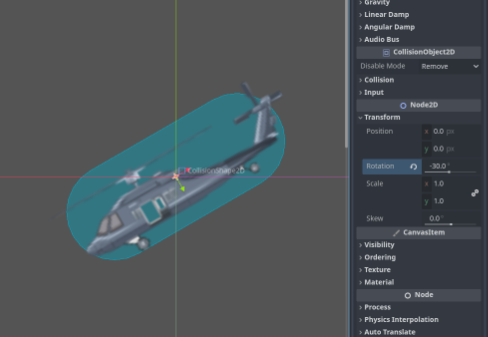
Keep in mind that you will find 2 problems: enemies die when colliding and also don’t do the hit_flash correctly. We will solve that in the next chapter.
- Run (F5) and observe.
Experiment with different values:
wave_amplitude = 100,wave_frequency = 2→ Slow and wide wave.wave_amplitude = 30,wave_frequency = 8→ Fast and short vibration.
Let’s Recap
sin(x): Function that oscillates between -1 and 1. Ideal for wave movement.cos(x): Same as sin, but 90° out of phase.- Time as input: Using
time += deltato feed the functions. - Amplitude: Multiplier that defines the range of movement.
- Frequency: Multiplier that defines the speed of the cycle.
- States: Combining patterns with
matchand timers.
In the next chapter, we will learn to create Combat Formations: groups of enemies that move coordinately.